MY STORY
So this happened about 4 months ago. Built this beautiful n8n workflow for a client with AI agents, conditional logic, the whole thing. Tested it locally maybe 50 times. Perfect every single time. Deployed it on a Friday evening and went to sleep feeling pretty good about myself. Saturday morning, my phone rings. Client. "The system's sending blank responses." I'm half awake, trying to sound professional, telling him I'll check it out. I open my laptop... everything looks fine on my end. I run a manual test. Works perfectly. But in production? Still blank. Spent the next 6 hours trying to figure out what was happening. No logs. No error messages. Just... nothing. Turned out the frontend was sending one field as null instead of an empty string, and my workflow just... continued anyway. No validation. Just processed garbage and returned garbage. Cost the client about 500 dollars of lost orders that weekend. Cost me way more in trust.
That whole experience changed how I build things. The actual workflow logic... that's honestly the easy part. The part that feels good. The hard part is all the stuff nobody talks about in tutorials. Now I check everything at the entry point. Does this user exist in my database? Is the request coming from where it should? Is the data shaped right? If any answer is no, the workflow stops immediately. I log everything now... what came in, what decisions got made, what went out. All to Supabase, not n8n's internal storage. Because when something breaks at 2 AM, I don't want to trace through 47 nodes. I want to see exactly what payload caused the issue in a clean database table.
Error handling was huge too. Before, if a workflow broke, users would see a loading spinner forever. Now they get an actual error message. I get a notification. I have logs showing exactly where it failed. I return proper status codes... 200 for success, 404 for unauthorized, 500 for internal errors. And I test everything with a separate database first. I try to break it. Send weird data. Simulate failures. Only when it survives everything do I move it to production.
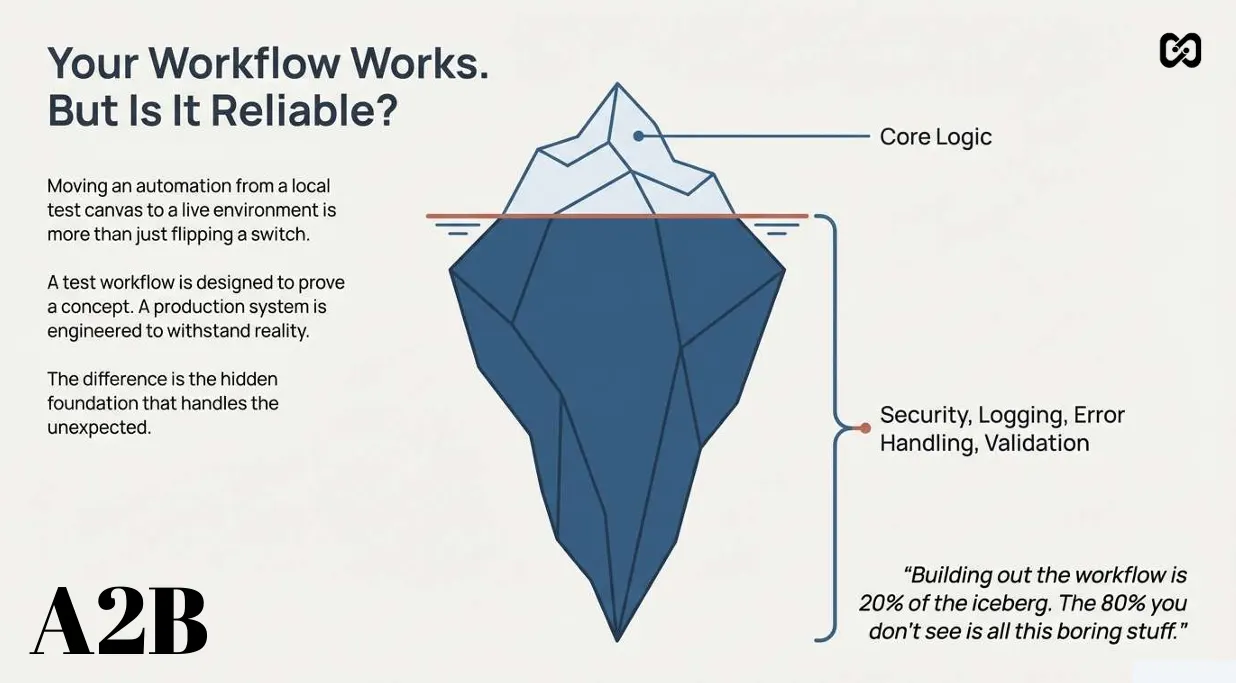
Here's the thing. The workflow you build locally... that's maybe 20 percent of what you actually need. The other 80 percent is security, validation, logging, and error handling. It's not exciting. It doesn't feel productive. But it's the difference between something that works on your machine and something that can survive in the wild. I still love building the logic part, the clever AI chains... that's the fun stuff. But I've learned to respect the boring stuff more. Because when a production workflow breaks, clients don't care how elegant your logic was. They just want to know why you didn't plan for this.
GUIDE
Your Automation is Only 20% Done: 5 Production-Ready Secrets for n8n
You've done it. After hours of tinkering, connecting nodes, and testing logic, your n8n workflow finally runs successfully from start to finish. This is where most people stop, believing the work is done. The reality is that building the functional workflow is just the tip of the iceberg — about 20% of the total effort.
The real work, the hidden 80%, lies in transforming that functional prototype into a production-ready system. Whether you're building a complex AI agent or a deterministic workflow with code nodes and API calls, this framework applies to any automation you create.
1. Embrace the 80/20 Rule: The Real Work Starts After it Works
The initial, creative process of building the core nodes of your workflow is a small fraction of the total effort required for a production system. The majority of the work involves making the system robust, secure, and transparent.
Adopting this mindset forces you to move beyond "Does it run?" to the far more critical question of "Can it run 10,000 times without failing?" It's the difference between a clever script and a dependable business asset.
2. Think Like a Bouncer, Not Just a Builder
Before you consider the workflow's core logic, production-ready thinking begins with security and access control. Your webhook is the front door to your club. Before anyone gets in, you need a bouncer to check their ID. This means asking two questions before any processing begins.
Who is this user? A workflow that interacts with users needs a way to validate and authorize them. If they aren't on the list, they don't get in.
How do I block danger? Even if a user is legitimate, you need to ensure the request is coming from a trusted source. Securing the webhook with header authentication requires a "password for entry" before the workflow even triggers.
3. Design Your Workflow to Fail Gracefully
In a production environment, failures are not just possible — they are expected. The key is to handle them intentionally so that the user is always informed and the system remains predictable.
Use the Webhook Response node to communicate status back to the front-end system. The three key response codes to use are: Status 200 for a successful response. Status 404 for an authorization error, telling the front end the user is not authenticated. Status 500 for an internal service error, communicating that the user was valid but a component inside the workflow failed.
This approach provides a clean, predictable experience for the user, even when things go wrong behind the scenes.
4. Become a Chronicler: Log Every Key Event
A chronicler doesn't just write down the ending of a story; they document every chapter. Log the full narrative of each execution — not just for catching errors but for understanding the quality of its work.
Log three key stages: what information was received, what was the key decision made with that information, and what was the final action or response. This detailed chronicle makes debugging incredibly fast. When a run fails, you can immediately see which stage it failed at and why.
5. Follow a Framework: Deconstruct, Analyze, and Mitigate
To move from a test workflow to a production system, replace random tinkering with a structured, repeatable framework.
First, deconstruct the system: break your automation down into its core components — the front-end interface, the API transport layer, and the core workflow logic. Second, analyze risks: for each component, list everything that could possibly go wrong. Third, implement mitigations: for every risk you listed, devise a specific solution. Add a database check for unknown users. Implement header authentication to secure the webhook. Create detailed logging for failures.
This methodical process transforms your workflow from a fragile script into a robust system.
Moving a workflow into production requires a fundamental shift in identity. You are no longer just a builder of features; you become an architect of reliable, resilient systems. By embracing the "boring" 80% — security, error handling, logging, and risk mitigation — you ensure that what you build can stand on its own and deliver consistent value over the long term.